
Building a Real-Time Feed System (From Frontend to Backend)
How I accidentally designed a fullstack micro-architecture just to push new posts to the top.
🧠 Background
What started as a simple frontend project to display posts in a feed turned into an unexpected journey into system design. I wanted one thing: when a new post is made, users should see a “🔄 New posts available” button, just like Twitter.
The simplest idea? Polling. The better idea? Server-Sent Events. The fun idea? Let's architect a real-time event-driven system with RabbitMQ.
🏗️ Overview of the Architecture
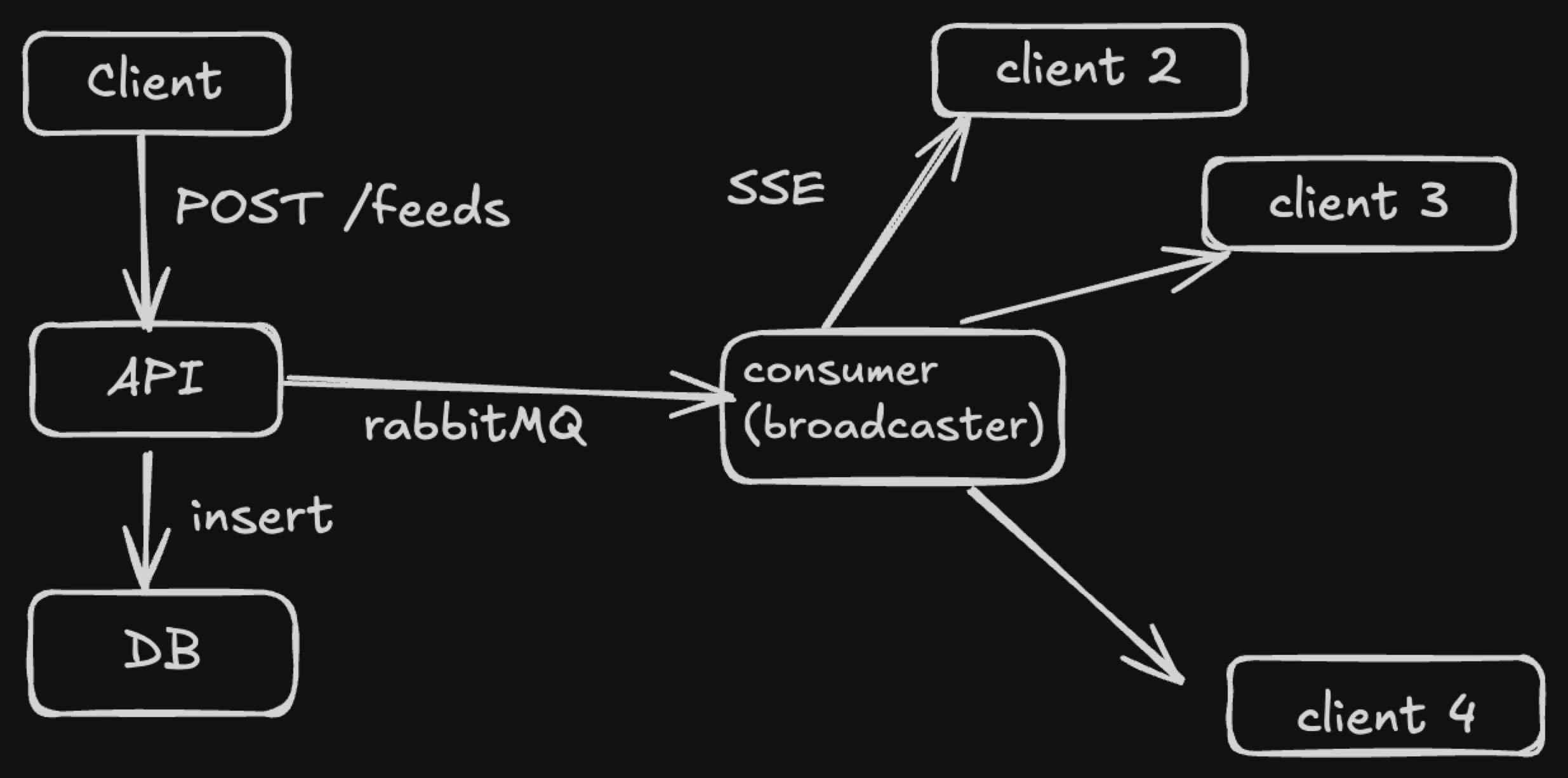
Let's walk through what happens when someone posts a feed item:
- Client sends a
POST /feedsrequest. - API inserts into PostgreSQL and publishes an event to RabbitMQ.
- A separate consumer service picks up that event and broadcasts it via Server-Sent Events (SSE) to connected clients.
It's decoupled, real-time, and scalable. Here's how I built it.
🧩 Tech Stack
- Frontend: Next.js (App Router), TanStack Query, Tailwind, shadcn/ui
- Backend API: Go + net/http
- Database: PostgreSQL
- Event Queue: RabbitMQ
- Real-time Layer: Server-Sent Events (SSE)
- Infra: Docker (RabbitMQ, Postgres)
🔧 Feed Insertion Flow
API (Go) handles POST /feeds, inserts into the DB, and publishes a FeedCreated event to RabbitMQ:
_ = queue.PublishFeedCreated(queue.FeedEvent{
  ID:      feedID,
  Content: req.Content,
  Author:  req.AuthorID,
  Time:    createdAt.Unix(),
})go
This decouples DB writes from broadcasting logic.
📨 Event Broadcasting with RabbitMQ + SSE
A separate consumer service listens to the feed.created queue and uses an in-memory SSE pool to push to all connected clients:
// Simplified
func ConsumeAndBroadcast() {
  for msg := range rabbitmq.Consume("feed.created") {
    var event FeedEvent
    json.Unmarshal(msg.Body, &event)
    broadcaster.Broadcast(event)
  }
}go
This design lets us horizontally scale consumers later.
📺 Frontend: Receiving New Feeds
We are going to use TanStack Query for data fetching, generally this is how TanStack Query works:
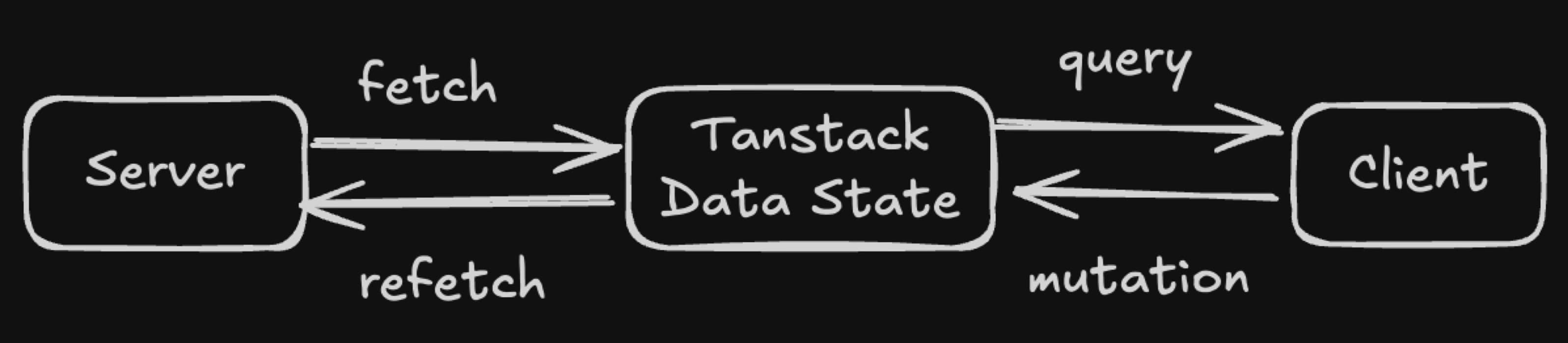
Using TanStack Query with useInfiniteQuery, we listen for SSE updates:
const eventSource = new EventSource('http://localhost:8080/events');
eventSource.onmessage = () => setHasNewFeed(true);ts
Then we show a pulse button:
{hasNewFeed && (
  <Button onClick={refetch} className="animate-pulse">
    🔄 New posts available
  </Button>
)}ts
📦 Pagination with Cursor
We use a base64-encoded composite cursor:
// backend
func EncodeCursor(ts int64, id string) string {
  return base64.URLEncoding.EncodeToString([]byte(fmt.Sprintf("%d|%s", ts, id)))
}go
And a smart SQL query with a tie-breaker:
WHERE (created_at < $1 OR (created_at = $1 AND id < $2))
ORDER BY created_at DESC, id DESC
LIMIT $3sql
This ensures no items are skipped across pages.
🎯 Why RabbitMQ?
-
Separation of concerns: API focuses only on DB operations.
-
Reliability: Even if the broadcaster is down, messages are buffered.
-
Scalability: Multiple consumers can process events (analytics, push, etc.).
📡 Why SSE over WebSocket? • Easier to implement • Reconnects out of the box •
Great for one-way communication like feeds
WebSocket is great too, but SSE won here for simplicity and performance.
🧠 What I Learned • Real-time UX requires backend orchestration.
- Message queues simplify scaling and reliability.
- Cursor pagination is trickier than you think.
- Simplicity matters: SSE > WS for one-way streams.
The Repo
Here's the repo for this project:
- Frontend:
https://github.com/lordronz/news-feed/ - Backend:
https://github.com/lordronz/news-feed-backend/
🧵 Final Thoughts
This started with just a scrollable list. But like most engineering journeys, solving a UI problem exposed gaps in architecture—and that's where the real fun begins.
So next time someone asks: “Can we show new posts instantly like Twitter?” — you'll know it's not just a button. It's a system.